How to Reactivate a Blocked SIM – Complete Guide
A blocked SIM in Pakistan can instantly disrupt communication, banking, and online verificati,on services, as almost every digital activity relies on mobile number authentication. Due to PTA regulations or biometric mismatch, CNIC issues, inactivity, and the security flags SIMs are usually blocked. Many users do not clearly understand whether their SIM is temporarily suspended or permanently blocked and it creates confusion. This guide explains all verified reasons behind SIM blocking and provides official and PTA-compliant methods to reactivate your SIM step by step. Whether your SIM belongs to Jazz, Zong, Ufone, or Telenor but this article covers complete and accurate recovery solutions.
Read More: Check SIM Owner Details Online
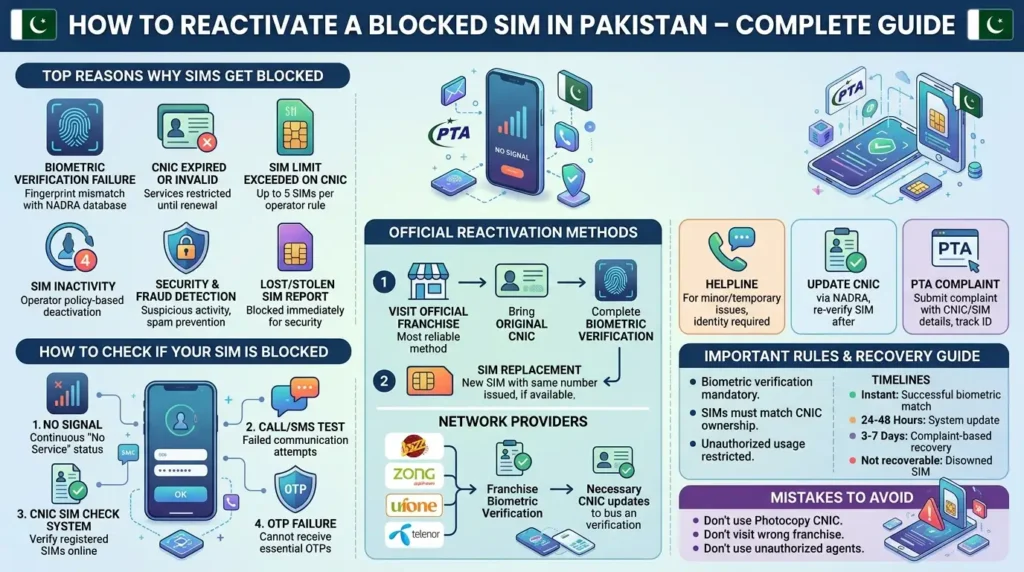
Reasons Why SIM Gets Blocked
Biometric Verification Failure
- Fingerprint mismatch with the NADRA database
- Failed verification at the franchise
CNIC Expired or Invalid
- SIM services may be restricted until the CNIC renewal
SIM Limit Exceeded on CNIC
- Up to 5 SIMs per CNIC per operator rule
- Extra SIMs may be blocked or suspended
SIM Inactivity (Operator Policy-Based)
- SIM may be deactivated after a long period of inactivity
- No fixed PTA timeline exists
- Each operator applies its own policy
Security or Fraud Detection
- Suspicious activity detected
- Spam or misuse prevention
Lost or Stolen SIM Report
- SIM is blocked immediately for security protection
Compliance-Based Blocking
- SIM blocked due to regulatory or verification requirements
- Handled under telecom operator systems
Types of Blocked SIMs in Pakistan
PTA-Regulated Blocked SIM
Managed under PTA rules, Pakistan Telecommunication Authority
Causes:
- biometric mismatch
- CNIC issue
- verification failure
Network Blocked SIM
Handled by telecom operators:
- Jazz Pakistan
- Zong Pakistan
- Ufone Pakistan
- Telenor Pakistan
Disowned SIM
- SIM removed from CNIC ownership record
- Usually not recoverable once reassigned
Temporarily Suspended SIM
- Can be restored after verification
How to Check If SIM is Blocked
No Signal Issue
- Continuous “No Service” indicates possible blocking
Call/SMS Test
- Failed communication = restriction
CNIC SIM Check System
- Verify registered SIMs on CNIC
OTP Failure
- Bank/app OTP not received
About More: Block Unauthorized SIM from CNIC – Complete Guide
How to Reactivate a Blocked SIM (Official Methods)
Franchise Visit Method (Most Reliable)
- Visit the official franchise
- Bring the original CNIC
- Complete biometric verification
- SIM is reactivated or replaced
Helpline Method
- Call network support
- Identity verification required
- Used for minor or temporary issues
PTA Complaint Method
Submit a complaint to the PTA system, Pakistan Telecommunication Authority
- Provide CNIC and SIM details
- Track complaint ID
- Wait for operator response
SIM Replacement Method
- New SIM issued with the same number (if available in the system)
CNIC Update Method
- Update CNIC via NADRA
- Re-verify the SIM afterward
Network-Wise SIM Reactivation
Jazz
- Franchise biometric verification
- SIM reissue if required
Zong
- Identity verification + system update
Ufone
- Biometric verification at the service center
Telenor
- CNIC + biometric verification required
PTA SIM Rules in Pakistan
- SIMs must match CNIC ownership
- Biometric verification is mandatory
- SIM limit per CNIC applies (operator-wise rule)
- Unauthorized SIM usage is restricted
- SIM data is maintained in the national database
Common Issues During Reactivation
- Fingerprint mismatch
- System downtime
- CNIC expired
- SIM already disowned
- Database delay
SIM Reactivation Time
- Instant: successful biometric match
- 24–48 hours: system update cases
- 3–7 days: complaint-based recovery
- Not recoverable: disowned SIM (most cases)
Mistakes to Avoid
- Using photocopy CNIC
- Visiting the wrong franchise
- Ignoring CNIC renewal
- Not checking the SIM status first
- Using unauthorized agents
If the SIM cannot Be Reactivated
- Apply for a new SIM
- Recover accounts via backup
- Switch network
- Update CNIC records
- Register a fresh number
Blocked SIM Recovery Time & Verification Guide
| Reactivation Scenario | Verification Required | Estimated Processing Time |
| Biometric verification issue | Biometric verification + original CNIC | Usually the same day |
| Expired CNIC issue | Renewed CNIC + biometric verification | Usually processed after CNIC update and verification |
| Lost or stolen SIM recovery | Ownership verification + original CNIC | Usually within a few hours |
| Damaged SIM replacement | Original CNIC + SIM ownership verification | Usually the same day |
| Temporary operator restriction | Identity verification | A few hours to 24 hours |
| SIM is inactive for a long period | CNIC + biometric verification | Depends on operator status |
| Complaint-based recovery case | PTA complaint + operator verification | Several days in some cases |
| SIM reassigned to another user | Not usually recoverable | Not applicable |
Read More: Transfer SIM Ownership in Pakistan – Complete Guide
Conclusion
A blocked SIM in Pakistan is usually recoverable through proper verification procedures at telecom franchises or through operator systems under PTA regulations. The most important factor is identifying the correct reason for blocking, such as a biometric mismatch, CNIC expiry, inactivity, or security restriction. By following official steps and keeping your CNIC updated and you can successfully reactivate your SIM and avoid future service disruptions.
FAQs
Can a permanently disowned SIM be recovered?
Usually, no, unless it is still available in the operator database.
Can a SIM be reactivated online?
No, biometric verification is required in most cases.
How many SIMs per CNIC?
Up to 5 SIMs per operator rule.
Why my SIM is blocked?
Due to PTA rules, verification issues, or operator security.
How to avoid SIM blocking?
Keep CNIC updated and use SIM regularly.